How can we help you?
-
myStock
-
- Articles coming soon
-
- Adding Product Recipes and Viewing Items
- Adding recipes
- Bulk settings
- Edit active menu pricing
- How to add products
- How to edit products (average cost, recipes and more)
- How to print barcodes from myStock
- How to review stock movements in stock enquiries
- How to search for products
- Stock Enquiries Grid Edit
- When to use stock enquiries
- Show Remaining Articles (1) Collapse Articles
-
- Articles coming soon
-
-
- Articles coming soon
-
- Articles coming soon
-
- Articles coming soon
-
- Articles coming soon
-
- Articles coming soon
-
- Articles coming soon
-
- Articles coming soon
-
-
-
- Articles coming soon
-
-
-
Accounting Integrations
-
- 01 - Requirements
- 02 - Connecting to Xero
- 03 - Integration Configuration
- 04 - Data Sync – TallOrder → Xero
- 05 - Data Sync – Xero → mySTOCK
- 06 - Product Matching & Item Creation
- 07 - Sync Monitoring & Error Handling
- 08 - Reconciliation Guidance
- 09 - Troubleshooting
- 10 - Frequently Asked Questions
- 11 - Disconnecting the Integration
- 12 - Support
- 13 - Data Flow Diagram
- Show Remaining Articles (3) Collapse Articles
-
-
TallOrder POS
-
TallOrder Add-ons
-
Features
-
FAQs
-
Merchant Settings
- Articles coming soon
-
Product Settings
- Articles coming soon
-
Customer Accounts, Loyalty & Promotions
- Articles coming soon
-
Staff Details
- Articles coming soon
-
Finance Settings
- Articles coming soon
-
POS User Guide
- Articles coming soon
-
Hardware
- Articles coming soon
-
Getting Started
- Articles coming soon
Cash Ups
Please note: Make sure that all Tabs on the Shift you are about to Cash Up on are closed/Checked out.
Once all the Tabs on the Shift has been closed, you will see a button on the top left (three white stripes). If you click on this button, you will see a drop-down menu where you need to click “End Shift” (Marked in Red):
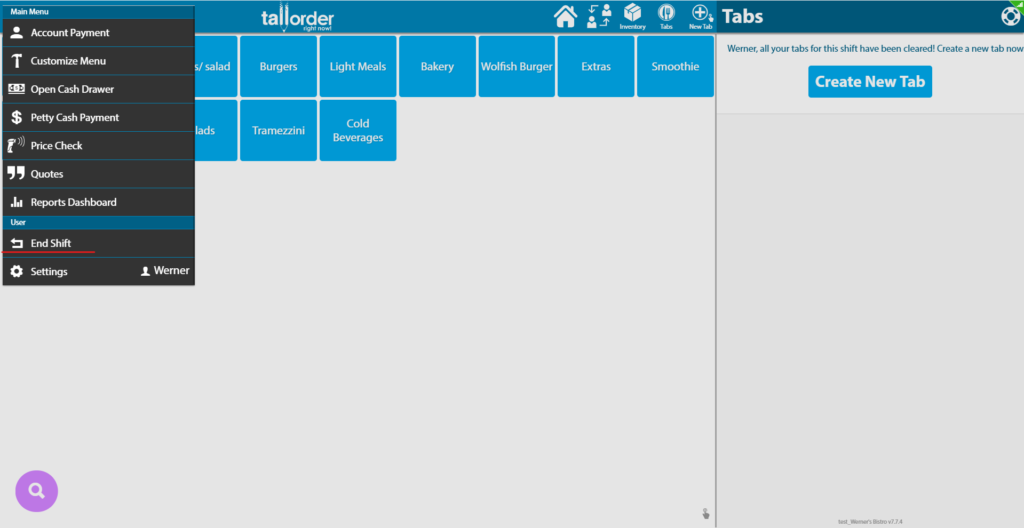
You can also access the End Shift process in “Settings” by clicking on the “End Shift” (Marked in Red):

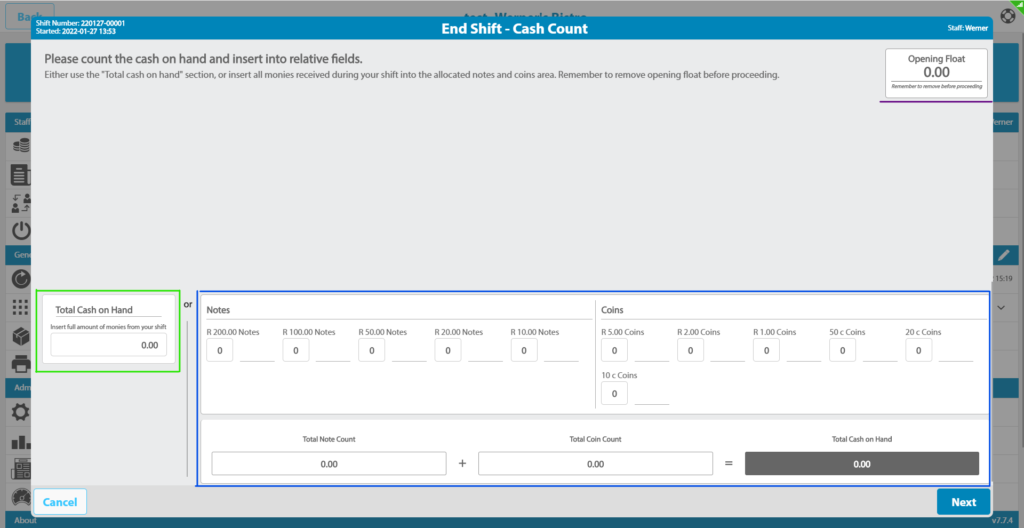
You then need to ONLY populate either the box on the left, marked in Green OR the box on the right marked in Blue. At right-hand option you need to add the number of notes that you have. Ex. 2 R200.00 notes, 4 R100.00 notes. The same goes for Coins.
Please note: Do not include your Opening Float amount when populating the Cash section of the Cash Up. You need to add the Opening Float amount that you took at the beginning of the Shift in the top right of the screen. (Marked in Purple):
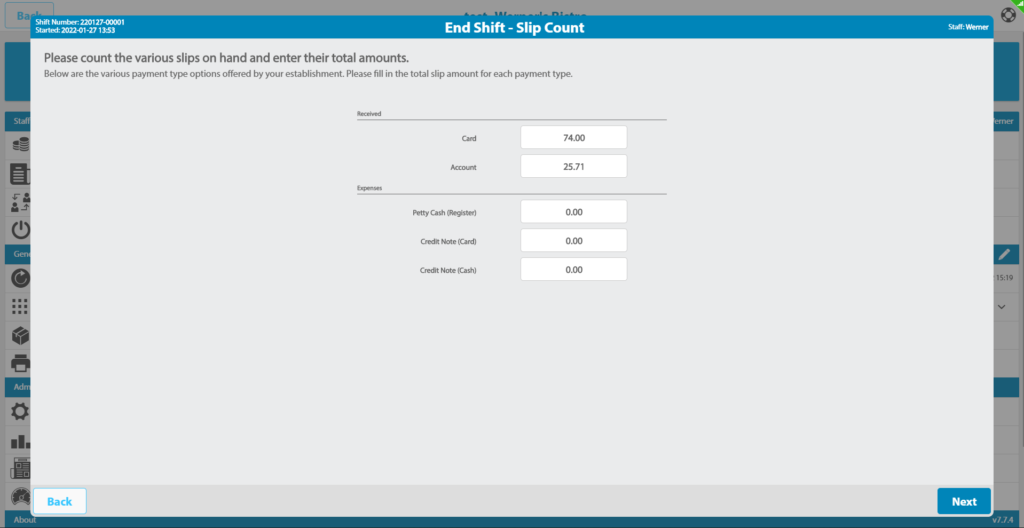
As shown in the picture below, you need to populate the received amounts that you have received. (Your Payment options might differ from the below picture).
Please Note: If a client makes an Account Payment to top up their accounts, you need to add that as cash if the payment type was Cash. Same goes for a Card
Account Payment. So, if it was Cash, you need to add it at step “c”. If it was a Card Payment you need to add it in step “d” by Card. If a Tab was paid by an account you need to add it by Account in the picture below.
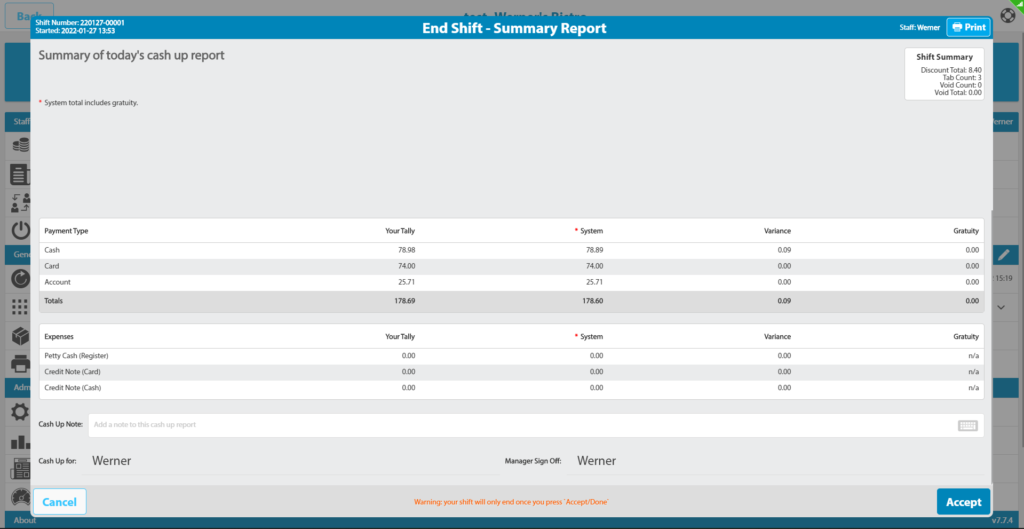
You will then see the following page where you can double check your Cash Up amounts.
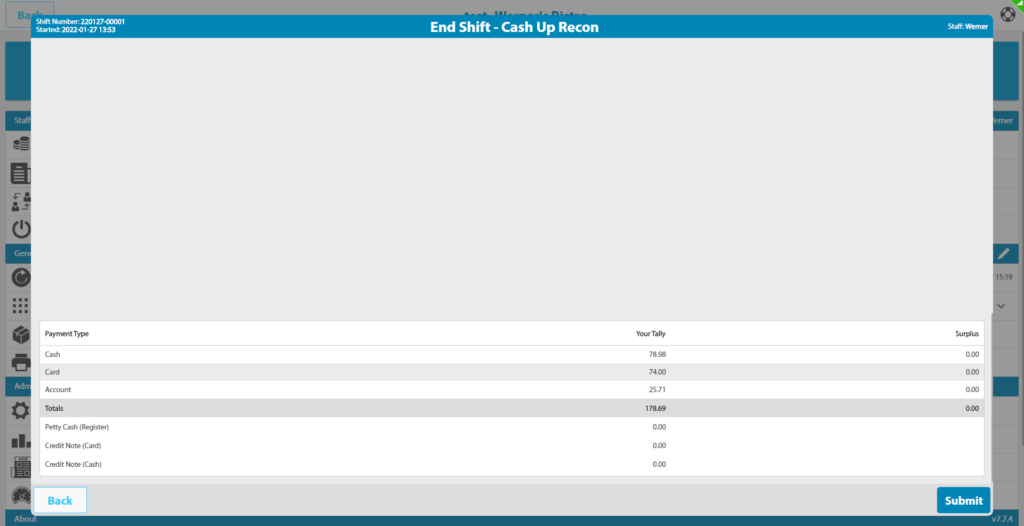
The last step is to see if there are any Variances. If so, you can click “Cancel” to redo the previous steps. The amounts under “System” are the amounts the system added up during your shift. If your tally is the same as what the system states, you won’t have any variances. Gratuity for each Payment Type will be stated on the far right.
Please Note: System total includes gratuity.