
How can we help you?
-
myStock
-
- Articles coming soon
-
- Adding Product Recipes and Viewing Items
- Adding recipes
- Bulk settings
- Edit active menu pricing
- How to add products
- How to edit products (average cost, recipes and more)
- How to print barcodes from myStock
- How to review stock movements in stock enquiries
- How to search for products
- Stock Enquiries Grid Edit
- When to use stock enquiries
- Show Remaining Articles (1) Collapse Articles
-
- Articles coming soon
-
-
- Articles coming soon
-
- Articles coming soon
-
- Articles coming soon
-
- Articles coming soon
-
- Articles coming soon
-
- Articles coming soon
-
- Articles coming soon
-
-
-
- Articles coming soon
-
-
-
Accounting Integrations
-
- 01 - Requirements
- 02 - Connecting to Xero
- 03 - Integration Configuration
- 04 - Data Sync – TallOrder → Xero
- 05 - Data Sync – Xero → mySTOCK
- 06 - Product Matching & Item Creation
- 07 - Sync Monitoring & Error Handling
- 08 - Reconciliation Guidance
- 09 - Troubleshooting
- 10 - Frequently Asked Questions
- 11 - Disconnecting the Integration
- 12 - Support
- 13 - Data Flow Diagram
- Show Remaining Articles (3) Collapse Articles
-
-
TallOrder POS
-
TallOrder Add-ons
-
Features
-
FAQs
-
Merchant Settings
- Articles coming soon
-
Product Settings
- Articles coming soon
-
Customer Accounts, Loyalty & Promotions
- Articles coming soon
-
Staff Details
- Articles coming soon
-
Finance Settings
- Articles coming soon
-
POS User Guide
- Articles coming soon
-
Hardware
- Articles coming soon
-
Getting Started
- Articles coming soon
Navigating between different stock locations

1. When you want to navigate between MyStock locations, you click on the globe.
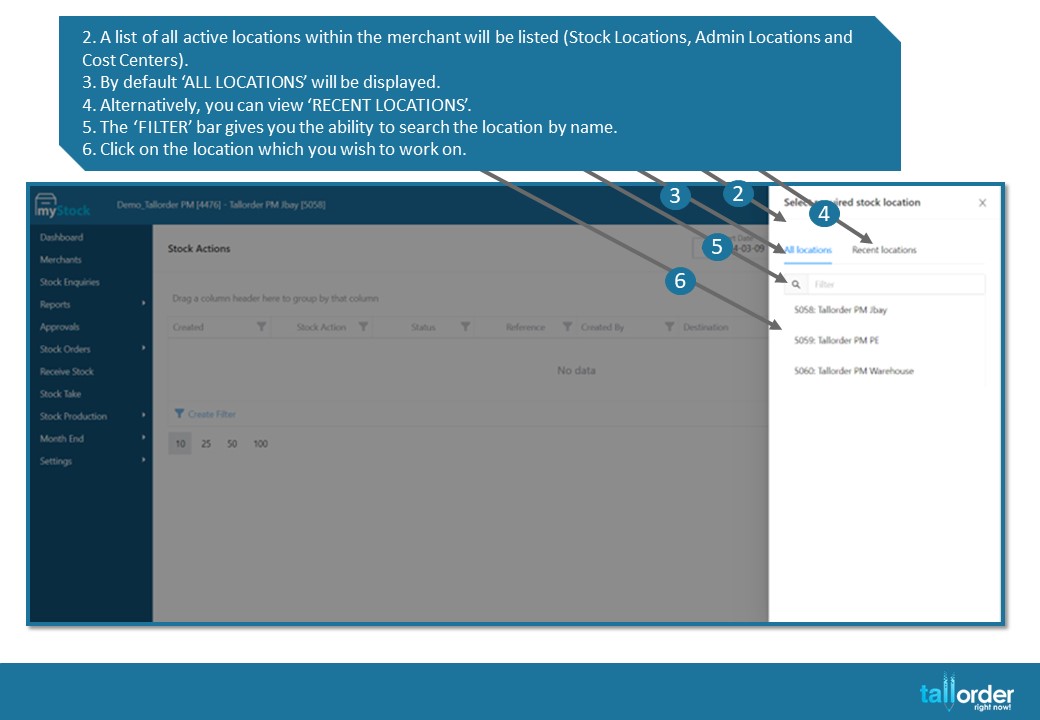
2. A list of all active locations within the merchant will be listed (Stock Locations, Admin Locations and Cost Centers).
3. By default ‘ALL LOCATIONS’ will be displayed.
4. Alternatively, you can view ‘RECENT LOCATIONS’.
5. The ‘FILTER’ bar gives you the ability to search the location by name.
6. Click on the location which you wish to work on.

7. The Merchant and Location bar will update with the chosen location.
Step-by-Step Breakdown
1. When you want to navigate between MyStock locations, you click on the globe.
2. A list of all active locations within the merchant will be listed (Stock Locations, Admin Locations and Cost Centers).
3. By default ‘ALL LOCATIONS’ will be displayed.
4. Alternatively, you can view ‘RECENT LOCATIONS’.
5. The ‘FILTER’ bar gives you the ability to search the location by name.
6. Click on the location which you wish to work on.
7. The Merchant and Location bar will update with the chosen location.