
How can we help you?
-
myStock
-
- Articles coming soon
-
- Adding Product Recipes and Viewing Items
- Adding recipes
- Bulk settings
- Edit active menu pricing
- How to add products
- How to edit products (average cost, recipes and more)
- How to print barcodes from myStock
- How to review stock movements in stock enquiries
- How to search for products
- Stock Enquiries Grid Edit
- When to use stock enquiries
- Show Remaining Articles (1) Collapse Articles
-
- Articles coming soon
-
-
- Articles coming soon
-
- Articles coming soon
-
- Articles coming soon
-
- Articles coming soon
-
- Articles coming soon
-
- Articles coming soon
-
- Articles coming soon
-
-
-
- Articles coming soon
-
-
-
Accounting Integrations
-
- 01 - Requirements
- 02 - Connecting to Xero
- 03 - Integration Configuration
- 04 - Data Sync – TallOrder → Xero
- 05 - Data Sync – Xero → mySTOCK
- 06 - Product Matching & Item Creation
- 07 - Sync Monitoring & Error Handling
- 08 - Reconciliation Guidance
- 09 - Troubleshooting
- 10 - Frequently Asked Questions
- 11 - Disconnecting the Integration
- 12 - Support
- 13 - Data Flow Diagram
- Show Remaining Articles (3) Collapse Articles
-
-
TallOrder POS
-
TallOrder Add-ons
-
Features
-
FAQs
-
Merchant Settings
- Articles coming soon
-
Product Settings
- Articles coming soon
-
Customer Accounts, Loyalty & Promotions
- Articles coming soon
-
Staff Details
- Articles coming soon
-
Finance Settings
- Articles coming soon
-
POS User Guide
- Articles coming soon
-
Hardware
- Articles coming soon
-
Getting Started
- Articles coming soon
Different stock locations (types)
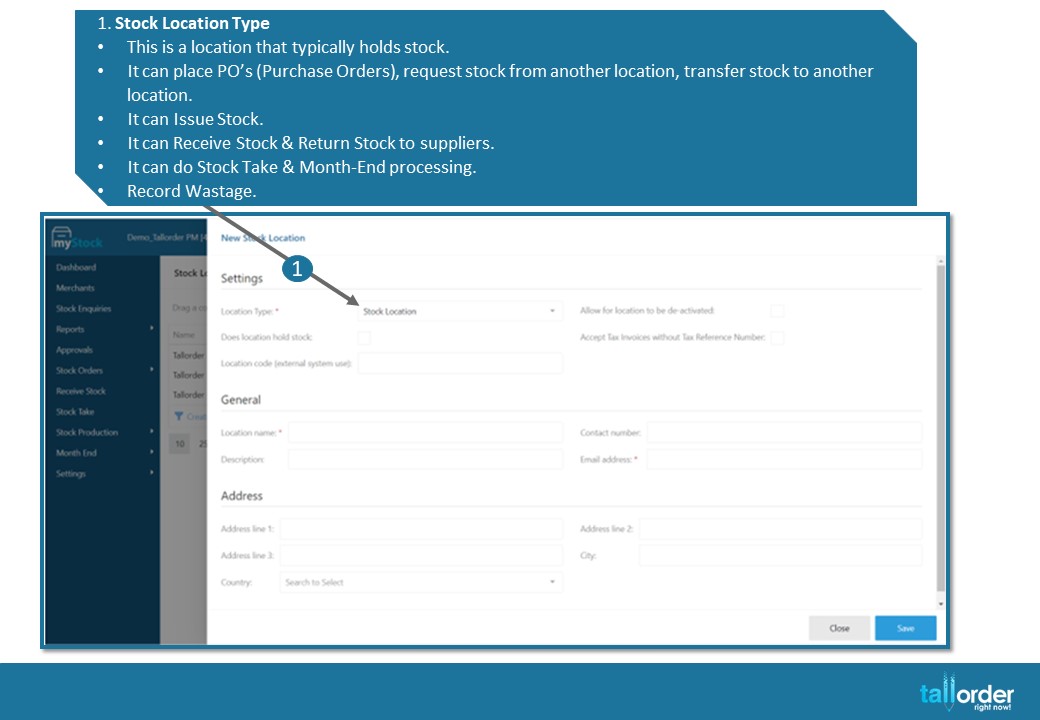
- Stock Location Type
- This is a location that typically holds stock.
- It can place PO’s (Purchase Orders), request stock from another location, transfer stock to another location.
- It can Issue Stock.
- It can Receive Stock & Return Stock to suppliers.
- It can do Stock Take & Month-End processing.
- Record Wastage.
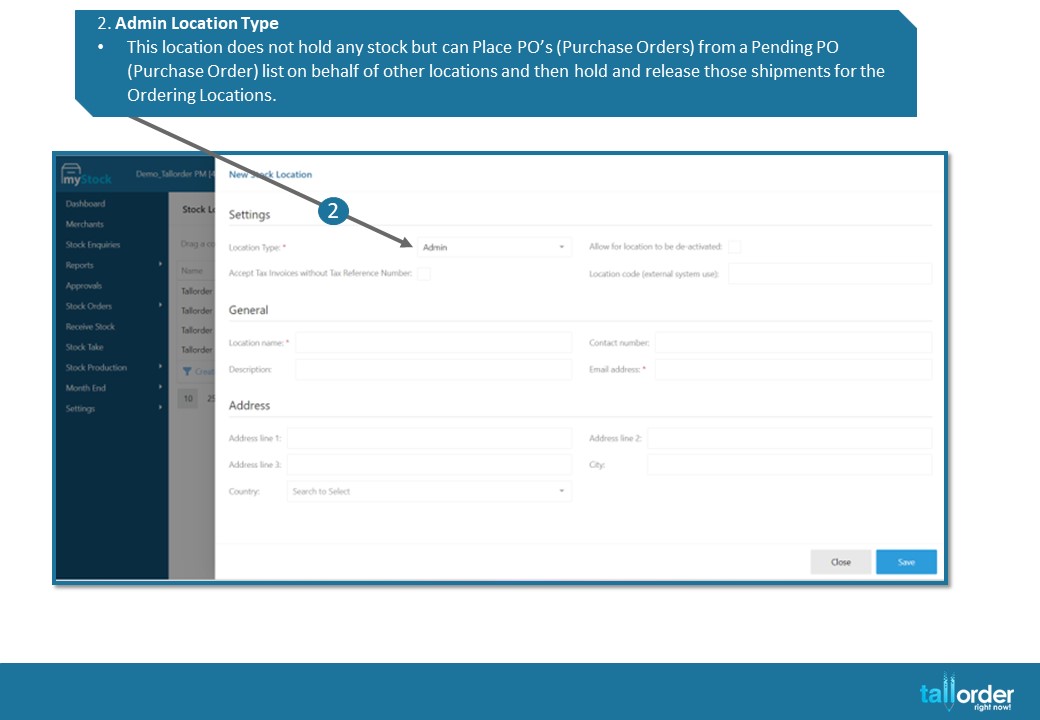
- Admin Location Type
- This location does not hold any stock but can Place PO’s (Purchase Orders) from a Pending PO (Purchase Order) list on behalf of other locations and then hold and release those shipments for the Ordering Locations.
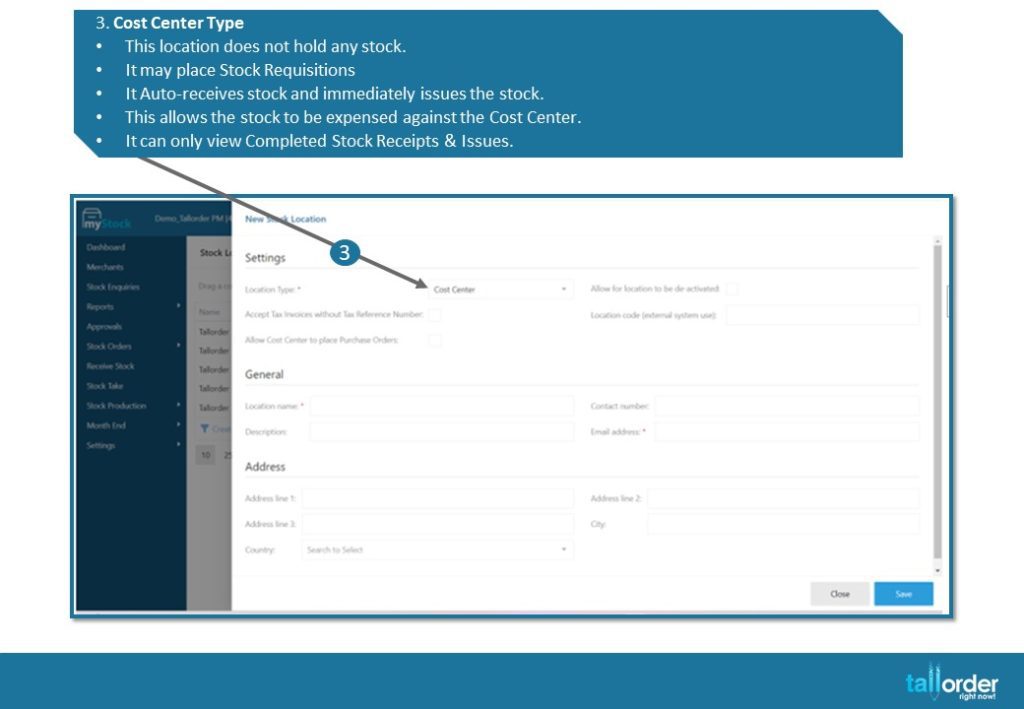
- Cost Center Type
- This location does not hold any stock.
- It may place Stock Requisitions
- It Auto-receives stock and immediately issues the stock.
- This allows the stock to be expensed against the Cost Center.
- It can only view Completed Stock Receipts & Issues.
STEP-BY-STEP BREAKDOWN
- Stock Location Type
- This is a location that typically holds stock.
- It can place PO’s (Purchase Orders), request stock from another location, transfer stock to another location.
- It can Issue Stock.
- It can Receive Stock & Return Stock to suppliers.
- It can do Stock Take & Month-End processing.
- Record Wastage.
- Admin Location Type
- This location does not hold any stock but can Place PO’s (Purchase Orders) from a Pending PO (Purchase Order) list on behalf of other locations and then hold and release those shipments for the Ordering Locations.
- Cost Center Type
- This location does not hold any stock.
- It may place Stock Requisitions
- It Auto-receives stock and immediately issues the stock.
- This allows the stock to be expensed against the Cost Center.
- It can only view Completed Stock Receipts & Issues.