
How can we help you?
-
myStock
-
- Articles coming soon
-
- Adding Product Recipes and Viewing Items
- Adding recipes
- Bulk settings
- Edit active menu pricing
- How to add products
- How to edit products (average cost, recipes and more)
- How to print barcodes from myStock
- How to review stock movements in stock enquiries
- How to search for products
- Stock Enquiries Grid Edit
- When to use stock enquiries
- Show Remaining Articles (1) Collapse Articles
-
- Articles coming soon
-
-
- Articles coming soon
-
- Articles coming soon
-
- Articles coming soon
-
- Articles coming soon
-
- Articles coming soon
-
- Articles coming soon
-
- Articles coming soon
-
-
-
- Articles coming soon
-
-
-
Accounting Integrations
-
- 01 - Requirements
- 02 - Connecting to Xero
- 03 - Integration Configuration
- 04 - Data Sync – TallOrder → Xero
- 05 - Data Sync – Xero → mySTOCK
- 06 - Product Matching & Item Creation
- 07 - Sync Monitoring & Error Handling
- 08 - Reconciliation Guidance
- 09 - Troubleshooting
- 10 - Frequently Asked Questions
- 11 - Disconnecting the Integration
- 12 - Support
- 13 - Data Flow Diagram
- Show Remaining Articles (3) Collapse Articles
-
-
TallOrder POS
-
TallOrder Add-ons
-
Features
-
FAQs
-
Merchant Settings
- Articles coming soon
-
Product Settings
- Articles coming soon
-
Customer Accounts, Loyalty & Promotions
- Articles coming soon
-
Staff Details
- Articles coming soon
-
Finance Settings
- Articles coming soon
-
POS User Guide
- Articles coming soon
-
Hardware
- Articles coming soon
-
Getting Started
- Articles coming soon
Stock take
When to Conduct Stock Takes with myStock:
Stock takes, also known as physical inventory counts or audits, are typically conducted at regular intervals or in response to specific events using myStock. Some common scenarios for conducting stock takes include:
- Periodic Inventory Checks:
With myStock’s inventory management features, you can schedule regular stock takes, such as monthly, quarterly, or annual counts, to reconcile inventory records with physical stock levels. These checks help ensure inventory accuracy and identify discrepancies or variances that may require investigation.
- End-of-Financial-Year:
Utilize myStock’s robust reporting capabilities to conduct stock takes at the end of your financial year. This ensures accurate assessment of inventory values for financial reporting purposes, maintaining compliance with accounting standards and providing an accurate representation of your organization’s assets.
- Before/After Significant Events:
Take advantage of myStock’s flexibility to conduct stock takes before or after significant events such as large sales promotions, seasonal changes, or warehouse reorganizations. This helps verify stock levels and assess the impact of the event on inventory levels efficiently.
- In Response to Stock Discrepancies:
When discrepancies are detected between recorded inventory levels and actual stock counts during routine operations, myStock facilities ad-hoc stock takes to identify the cause of discrepancies and rectify inaccuracies swiftly.
- Summary:
In summary, myStock streamlines the stock take process, enabling efficient scheduling, accurate counting, seamless verification, easy adjustments, and insightful reporting. By leveraging myStock’s capabilities, organizations can maintain accurate inventory records, ensure compliance, and optimize inventory management practices effectively.
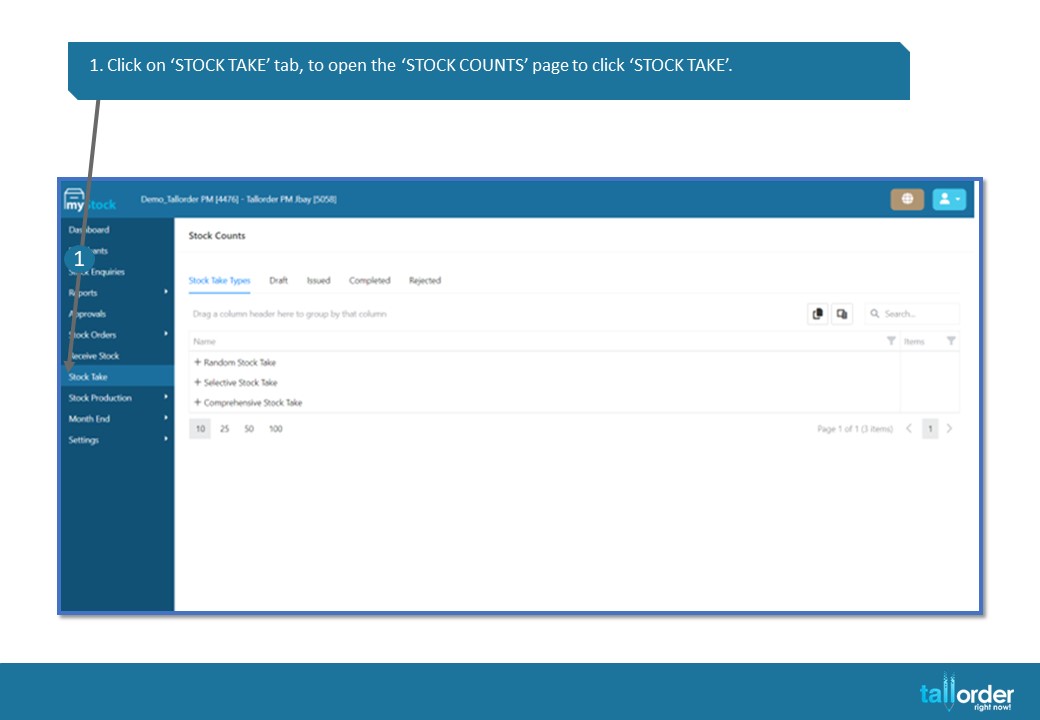
- Click on ‘STOCK TAKE’ tab, to open the ‘STOCK COUNTS’ page to click ‘STOCK TAKE’.