Logo Logo Logo Logo Logo
Request a FREE Demo
  • Go to tallorderpos.com
  • Go to tallorderpos.com

How can we help you?

  • myStock

    • Merchants

      • Articles coming soon
    • Stock Enquiries

      • Adding Product Recipes and Viewing Items
      • Adding recipes
      • Bulk settings
      • Edit active menu pricing
      • How to add products
      • How to edit products (average cost, recipes and more)
      • How to print barcodes from myStock
      • How to review stock movements in stock enquiries
      • How to search for products
      • Stock Enquiries Grid Edit
      • When to use stock enquiries
      • Show Remaining Articles (1) Collapse Articles
    • Customer Enquiries

      • Articles coming soon
    • Reports

      • Sales Reports

        • Credit Notes Report
        • Department Sales Report
        • Item Sales Report
        • Promotions Report
        • Staff Sales Report
        • Summary Sales Report
        • Tag Sales Report
        • Tax & Fees Report
        • Tax Invoice Summary
      • Inventory Reports

        • Current Inventory
        • Inventory
        • Re-Order
        • Stock Movements
      • Stock Take Reports

        • Articles coming soon
      • Production Reports

        • Articles coming soon
      • Shifts Reports

        • Attendance Report
      • Payments Report

        • Articles coming soon
      • Suppliers Reports

        • Articles coming soon
      • Supplier Return Reports

        • Articles coming soon
      • Purchase Order Reports

        • Articles coming soon
      • Transfers Reports

        • Articles coming soon
      • Reports
    • Approvals

      • How to set up Approval levels
      • How to use Approval levels effectively
      • What is approval levels
    • Stock Orders

      • Purchase Orders

        • Purchase order from Pending Purchase order
        • Purchase orders
      • Requisitions

        • Requisitions
      • Transfers

        • Transfers
      • Stock Issue

        • Stock issue
      • Wastage

        • Wastage
      • Return Stock

        • Stock Returns
      • Consistent process across all stock orders
      • What stock order options are available
    • Receive Stock

      • How to receive stock
      • How to reject stock
      • When do you receive stock
    • Stock Take

      • Different stock take types
      • How to do a stock take
      • Stock take
      • Stock Take Explained
    • Stock Production

      • Production Order

        • Production orders (new)
      • Production Acceptance

        • Articles coming soon
      • Production order from pending production list
      • Stock production
    • Month End Process

      • Complete Processing
      • Month End
      • Month end items
      • Month end review
      • Opening processing
      • Review
      • Status of Month end
    • Settings

      • Stock Locations

        • Different stock locations (types)
        • How to set up stock locations
        • Navigating between different stock locations
      • Suppliers

        • Adding a new supplier
        • Exporting Supplier details
        • Setting up a supplier
      • Departments

        • How to set up departments
        • Use of departments
      • Access Control

        • How to set up Access control and why
        • What does Access control mean
      • Reasons

        • How to set up reasons
        • When to use reasons
      • Settings
    • General

      • Clipboard
      • Grids
      • How to navigate myStock
      • Log into myStock Manual
      • TallOrder In Browser PDF Viewer Manual
  • TallOrder POS Inventory

    • Creating a Purchase Order
  • Accounting Integrations

    • Xero Integration

      • 01 - Requirements
      • 02 - Connecting to Xero
      • 03 - Integration Configuration
      • 04 - Data Sync – TallOrder → Xero
      • 05 - Data Sync – Xero → mySTOCK
      • 06 - Product Matching & Item Creation
      • 07 - Sync Monitoring & Error Handling
      • 08 - Reconciliation Guidance
      • 09 - Troubleshooting
      • 10 - Frequently Asked Questions
      • 11 - Disconnecting the Integration
      • 12 - Support
      • 13 - Data Flow Diagram
      • Show Remaining Articles (3) Collapse Articles
    • Importing Customers from Sage
    • Sage Integration - Current Version
    • Sage Pastel Accounting Setup
    • Sage Setup on TallOrder
  • TallOrder POS

    • Cash Ups
    • Creating a Menu
    • Customer Quotes
    • Doing an Account Payment
    • Full POS User Guide
  • TallOrder Admin

    • Adding a Staff Member
    • Adding more Payment Types
    • Adding more Tax Types
    • Creating Departments
    • Creating Headings
    • Creating Menu Add-ons
    • Creating Products
    • Creating Recipes for Products on Admin
    • Creating Tags and using them on the POS
    • Enabling Bulk Settings
    • Enabling Inventory Stock Control
    • Enabling Laybys
    • Enabling Pro Forma
    • Exporting Product Lists
    • How to create a New Customer Account
    • myReports
    • Partner Admin
    • Setting up Customer Types
    • Setting up Locations
    • Setting up Loyalty
    • Setting up Petty Cash
    • TallOrder Admin Manual
    • Show Remaining Articles (12) Collapse Articles
  • TallOrder Add-ons

    • PageMan Login
    • SlipApp Login
    • TallOrder Now Login
    • ToGo Login as a User
  • Features

    • Hospitality Features

      • Accounting Integration
      • Add-ons
      • CRM
      • Customer Support
      • Integrated Payments
      • Menu Engineering
      • Order Management - SlipApp
      • PMS
      • Reporting & Analytics
    • Retail Features

      • Accounting Integration
      • Add-ons
      • Inventory Management
      • Loyalty
      • Point of Sale
      • Reporting & Analytics
      • Staff Management
      • Support
  • FAQs

    • mytab FAQs
    • TallOrder FAQs
  • Merchant Settings

    • Articles coming soon
  • Product Settings

    • Articles coming soon
  • Customer Accounts, Loyalty & Promotions

    • Articles coming soon
  • Staff Details

    • Articles coming soon
  • Finance Settings

    • Articles coming soon
  • POS User Guide

    • Articles coming soon
  • Hardware

    • Articles coming soon
  • Getting Started

    • Articles coming soon
  • Main
  • Accounting Integrations
  • Xero Integration
  • 13 - Data Flow Diagram

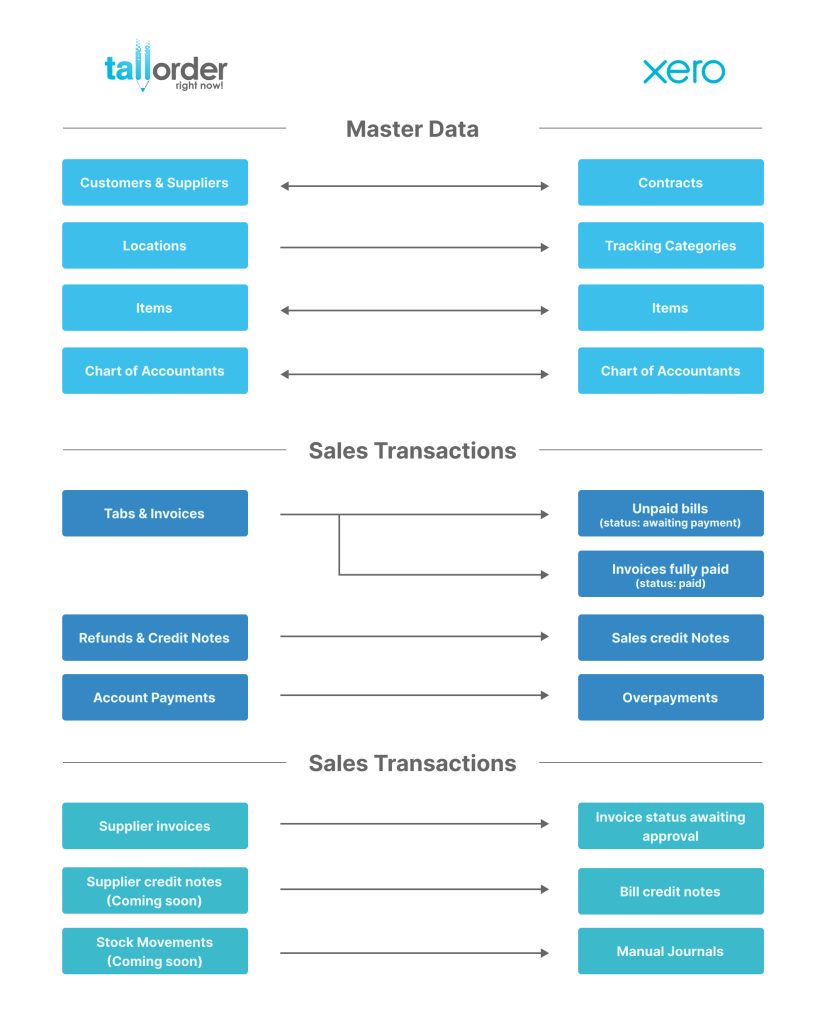
13 – Data Flow Diagram

<p>Contact</p>

Terms and Conditions | Privacy Policy | EULA | Referral Terms and Conditions | © Copyright 2024 TallOrder Solutions Pty (Ltd).